On a medical-device component assembly line, the hard part is not “getting a clear shot of a bracket.” It is making sure every unit follows the same sequence: place the paper pad → first adhesive pass → second adhesive pass → apply the label and start the timer, then release. A missed glue pass or a timer that never starts has to be stopped at the station.
This article follows a real cleanroom assembly monitoring video and the visual-agent operator interface, from the station itself to the process timeline, then into the workflow, events, and state machine. The configuration screenshots are taken from the live tensor-flow canvas and line up with the assembly actions in the video.
What the visual agent looks like
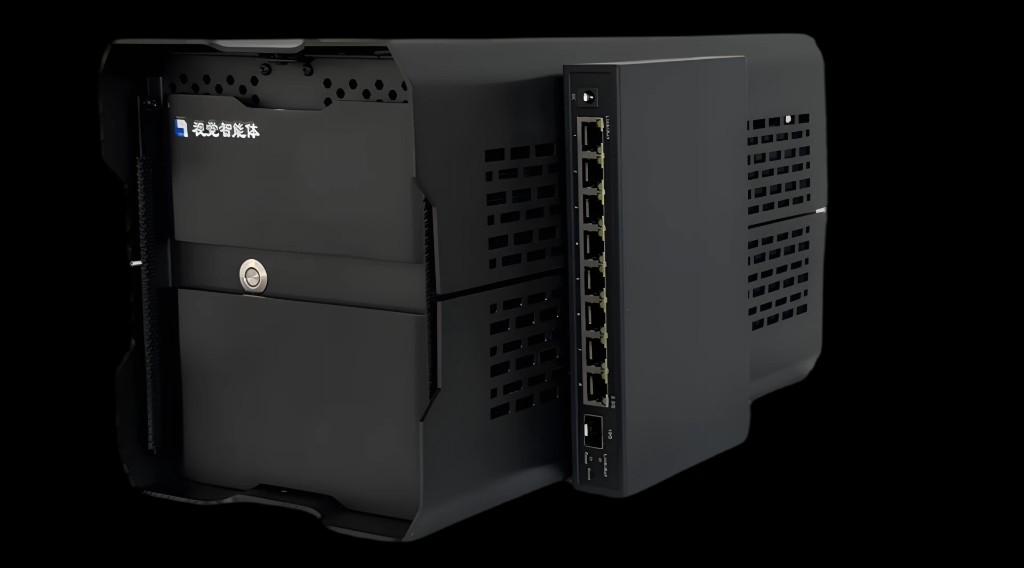
The hardware that actually sits on the line is an edge visual agent: integrated compute and multiple network interfaces, so industrial cameras can be attached directly. Capture, inference, and SOP state updates all happen beside the station.
01 | The real assembly station in the video
Materials are clearly zoned. The support bracket on the fixture tray is the part that gets glued. The barcode label and the electronic timer belong to the last step: apply the label and start the timer. The vision system has to see the relationship among the operator, the parts, and the fixture—not just judge appearance from a single frame.
02 | Four steps: what each one checks
The runtime checklist matches the state-graph event tensor. The video shows four sequential steps:
Swipe the table sideways to see all columns
| Event | Step | What vision watches |
|---|---|---|
| E0 | Place the paper pad | Whether a white paper pad appears in the work area of the table mat |
| E1 | First adhesive pass | Primer / first glue pass, and the part seated on the fixture |
| E2 | Second adhesive pass | Whether the second glue pass is performed; it cannot be skipped |
| E3 | Apply label and start timer | Label in place + timer started, then cure wait begins |
A missed process step costs more than a cosmetic defect
In medical-device assembly, a skipped glue pass or a cure timer that never starts often shows up only at reliability testing—or in a customer complaint. Recall and compliance cost far more than stopping the unit at the station. Process monitoring has to lock sequence, action presence, and timing at the workstation.
03 | Workflow configuration
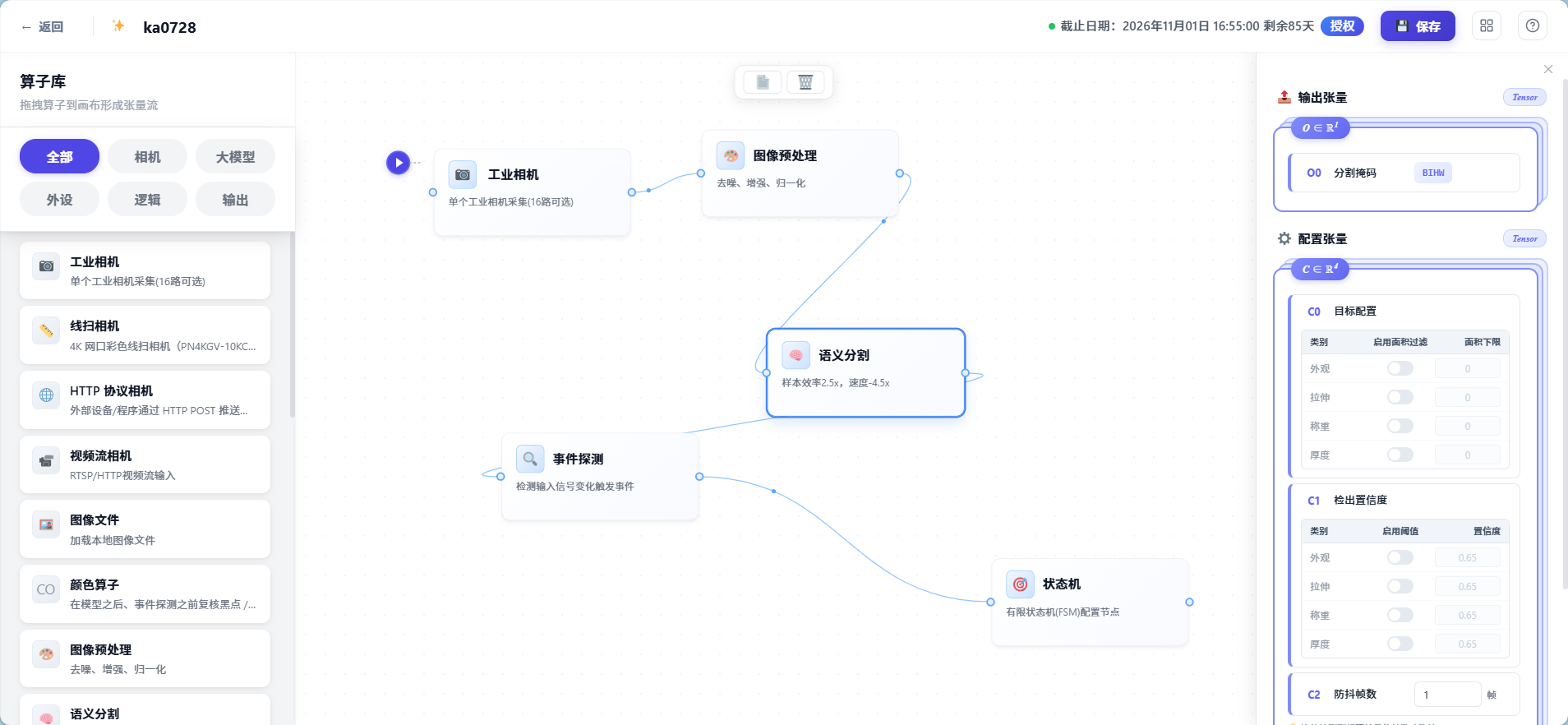
Detection chain: industrial camera → image preprocessing → semantic segmentation → event detection → state machine. Click the image to enlarge the original pixels with no extra compression. Drag with one finger; pinch or use the buttons to zoom.
04 | Turning “glue pass complete” into a standard signal
Primitive library · object present / action occurred / dwell time
Open the event composer and configure one step at a time. Take the first adhesive pass as an example:
- “First adhesive pass / second adhesive pass” can combine “glue tool appears + dwell time inside the fixture ROI”;
- “Apply label and start timer” can attach “label present + timer reading change / started state”;
- “Place the paper pad” can attach “paper pad appears in the work area of the table mat.”
State-machine event list (illustrative)
Swipe the table sideways to see all columns
| Event | Name | Configuration notes |
|---|---|---|
| E0 | Place the paper pad | Paper pad appears in the center work area of the table mat |
| E1 | First adhesive pass | First glue pass completed |
| E2 | Second adhesive pass | Second pass cannot be skipped; it needs its own event |
| E3 | Apply label and start timer | Label in place and timer started |
Missed steps can be tied to “object absent” or “dwell time not reached,” which drives the intercept branch. Recognition results are packaged as events. The state machine and the runtime checklist subscribe to them directly.
05 | NG types / display parameters
Parameter setup · page parameters
Open Parameter Setup and align the NG dictionary with the four steps, so misses can be counted by NG type:
Swipe the table sideways to see all columns
| NG type | Name | Description |
|---|---|---|
| NG0 | Paper pad missing | No paper pad seen in the work area |
| NG1 | First adhesive pass missing | First glue pass not completed |
| NG2 | Second adhesive pass missing | Second pass skipped, or dwell time not reached |
| NG3 | Label or timer missing | Label absent, or timer not started |
06 | Comparison and what we learned on the project
Swipe the table sideways to see all columns
| Aspect | Traditional assembly station | Visual SOP process monitoring |
|---|---|---|
| Identify materials / fixtures | Spot checks by the team lead | Semantic segmentation identifies the pad, fixture, label, and related objects in real time |
| Control sequence | Habit and a paper SOP | State graph S0–S4 enforces order |
| Control adhesive | Sign-off that is hard to re-check | Step gates on “present + appears in region + dwell” |
| Control timing | Depends on the operator pressing the timer | Dual confirmation: label + timer started |
| Keep records | Paper checkmarks filled in afterward | Step trace, images, and NG records kept automatically |
What has to be true on the floor
- Business requirement: every unit completes all four steps; both glue passes, labeling, and timing cannot be skipped;
- Decision rule: the current state accepts only its matching event. Release is allowed only after the set is complete and the timer has started.
Closing
The hard part of monitoring medical-device assembly is not recognizing a paper pad or a timer. It is chaining recognition in place → event report → state advance → NG statistics → release record into a path the line will actually use, and that quality and compliance can stand behind in a review.
In one line: the visual agent recognizes station targets, event composition reports the step, the state machine controls sequence, and the parameter page owns the NG dictionary—so the station moves from “someone watching” to “the system checking each step.”